

How to Create a WordPress Contact Form Using FormsKit
Learn how to build a beautiful WordPress contact form in minutes — with drag and drop, conditional logic, file uploads, and multi-step forms. All free.
WordPress contact form creation is simple with FormsKit — a free drag and drop form builder plugin with 25+ fields, conditional logic, and multi-step forms.
📋 Table of Contents
- Install & Activate FormsKit
- Create Your First WordPress Contact Form (8 Fields)
- Advanced Components — Placeholders, Smart Tags & Conditional Logic
- Set Up Email Notifications (2 Free)
- All Free Fields — Complete Guide
- Create a Multi-Step Contact Form
- Pro Plan Fields — Unlock Advanced Power
- Elite Plan Fields — Payment & E-Commerce
- Coming Soon — Quiz, Survey, Registration & More
- Direct Integrations — HubSpot, Mailchimp & 10+ Platforms
- How Rowerr Can Help You Build Better Forms
- Frequently Asked Questions
Install & Activate FormsKit — Your Free Form Builder Plugin
The first step to creating a WordPress contact form is installing FormsKit. It is available on the official WordPress plugin repository, so installation takes less than a minute.
- Go to your WordPress dashboard. Click Plugins → Add New.
- In the search bar, type "FormsKit" and press Enter.
- Find FormsKit Lite in the results. Click Install Now.
- After installation, click Activate.
Create Your First WordPress Contact Form (8 Fields)
Now let us build a simple WordPress contact form with 8 fields. FormsKit uses a drag and drop form builder, so you do not need any coding knowledge. Just drag fields from the left sidebar and drop them onto your form canvas.
2.1 — Create a New Form
- Click FormsKit → Add New in your WordPress dashboard.
- Give your form a name — for example, "Contact Us".
- You will see the drag and drop form builder with a blank canvas on the right and field types on the left.

2.2 — Add Your 8 Contact Form Fields
Drag these 8 fields one by one from the left sidebar onto the canvas to create your WordPress contact form:
- Name Field — Drag the "Name" field. It automatically creates First Name and Last Name inputs. Your visitor's full name will be captured.
- Email Field — Drag the "Email" field. This validates the email format automatically. Every WordPress contact form needs an email field.
- Phone Field — Drag the "Phone" field. It includes a country code selector with flags and auto-formatting.
- Text Field — Drag a "Text" field and rename the label to "Subject". This lets visitors write the topic of their message.
- Dropdown Field — Drag a "Dropdown" field. Label it "Department" and add choices like Sales, Support, Billing, and Other.
- Textarea Field — Drag a "Textarea" field. Label it "Your Message". This is where visitors will type their detailed message.
- File Upload Field — Drag a "File Upload" field. This lets users attach documents or images to their WordPress contact form submission.
- Consent / GDPR Field — Drag the "Consent" field. Add your privacy policy text. This makes your WordPress contact form GDPR compliant.

2.3 — Save & Embed Your WordPress Contact Form
- Click Save at the top-right of the builder.
- To add the form to a page, use the Gutenberg block (search "FormsKit"), the Elementor widget, or the shortcode:
[formskit id="123"] - Preview your page — your WordPress contact form is now live!
Advanced Components — Placeholders, Smart Tags & Conditional Logic
FormsKit is more than a basic form builder plugin. Every field comes with powerful advanced options. Let us explore the most important ones for your WordPress contact form.
3.1 — Placeholder Text
A placeholder is the light gray text inside an input field that disappears when the user starts typing. It gives users a hint about what to enter. For example, your Email field can show "e.g. john@example.com" as a placeholder.
To set a placeholder: click any field → go to the General tab → find Placeholder and type your hint text.
3.2 — Field Size
You can control how wide each field appears. Options include Small, Medium, and Large. This is useful for placing two fields side by side on your WordPress contact form — like First Name (Medium) and Last Name (Medium) on one row.
3.3 — Default Value
A default value is a pre-filled answer that appears in the field when the form loads. Unlike placeholders, default values are actual submitted data if the user does not change them. Use this for fields like Country or Department that have a common answer.
3.4 — Smart Tags (Dynamic Tags)
Smart Tags are dynamic placeholders that auto-fill with real data. Use them in field defaults, email notifications, and confirmations. FormsKit includes 20+ built-in Smart Tags:
{user_email}— Auto-fills the logged-in user's email{user_display}— Auto-fills the user's display name{site_name}— Your website name{page_url}— The URL of the page containing the WordPress contact form{date}— Today's date{unique_value}— A unique ID for each submission

3.5 — Conditional Logic
Conditional logic lets you show or hide fields based on user input. This is a powerful feature that most form builder plugins charge $49–99/year for. In FormsKit, it is completely free.
Example: Show a "Company Name" field only when the Department dropdown is set to "Sales".
You can set AND rules (all conditions must match) or OR rules (any condition can match). This makes your WordPress contact form smarter and shorter for users who do not need every field.

3.6 — Checkbox with Images & Icons
Checkboxes are not just boring text options. FormsKit lets you add images and icons to checkbox choices. This makes your conditional logic form more visual and engaging. Perfect for product selection forms, service inquiries, and surveys.

3.7 — Dropdown Default Value
For dropdown fields, you can set a default selected option. This pre-selects a choice when the WordPress contact form loads. Useful for the most common department or category.
Set Up Email Notifications — 2 Free Emails Per Form
Every WordPress contact form needs email notifications. FormsKit offers 2 notification emails free per form — one for the admin and one for the visitor (confirmation email).
4.1 — Admin Notification Email
This email goes to you (the site owner) every time someone submits the WordPress contact form.
- In the form builder, click the Settings tab (gear icon).
- Go to the Notifications section.
- The first notification is pre-configured. Set the Send To field to
{admin_email}. - Set the Subject to something like: "New Contact Form Submission from {field:name}".
- In the Message Body, use
{all_fields}Smart Tag — it creates a beautiful table of all submitted data. - Set the Reply-To to
{field:email}so you can reply directly to the visitor.
4.2 — Visitor Confirmation Email
This email goes to the person who submitted the WordPress contact form. It confirms that their message was received.
- Click Add New Notification to create the second email.
- Set Send To to
{field:email}— this sends it to the visitor's email. - Set the Subject to: "Thank you for contacting us, {field:name}!"
- Write a friendly confirmation message in the body. Use Smart Tags like
{site_name}for personalization. - Click Save.
{field:field_id} to include any submitted value.All Free Fields — Complete Guide to Every Lite Field
FormsKit Lite gives you 18 field types completely free. No registration, no paywall. Here is a complete guide to every free field you can use in your WordPress contact form.
Text Free
Single-line text input. Use for names, subjects, short answers. Supports placeholder, default value, min/max length, and input mask.
Textarea Free
Multi-line text area for long messages. Control the number of rows and character limit. Perfect for the "Your Message" field in a WordPress contact form.
Email Free
Email input with built-in validation. Prevents invalid email submissions. Supports confirmation email field, DNS validation, and Smart Tags.
Number Free
Numeric input with min, max, and step controls. Use for quantities, order numbers, or age fields. Supports integer or decimal modes.
Name Free
Structured name field with First Name and Last Name. Choose simple or extended format (with title, middle name, suffix).
Phone Free
Phone number input with international country code selector, flag icons, and auto-formatting. Validates phone number format.
Address Free
Full address field with Street, City, State, ZIP, and Country inputs. Auto-populates country list. Perfect for shipping or billing forms.
Date / Time Free
Date and time picker with calendar popup. Choose date-only, time-only, or both. Set min/max dates and disable specific days.
URL Free
URL input field with validation. Ensures users enter a valid web address. Great for portfolio or website links on a WordPress contact form.
Password Free
Password input with strength meter. Supports min length, required characters, and confirmation field. Use for registration forms.
Dropdown Free
Select dropdown with unlimited options. Supports default value, placeholder text, and conditional logic. Essential for Department or Category fields.
Radio Free
Radio button group for single-choice questions. Supports image choices and icons. Use for "How did you hear about us?" type questions.
Checkbox Free
Multi-choice checkboxes. Supports image and icon choices. Set min/max selections. Perfect for "Select your interests" fields.
Number Slider Free
Interactive range slider. Set min, max, and step values. Shows real-time value. Great for budget ranges or satisfaction scores.
File Upload Free
Drag-and-drop file upload with configurable size limits and allowed file types (images, PDFs, docs). Supports multiple files.
CAPTCHA Free
Built-in spam protection. Choose from math puzzle, custom question, Google reCAPTCHA v2/v3, Cloudflare Turnstile, or hCaptcha.
Page Break Free
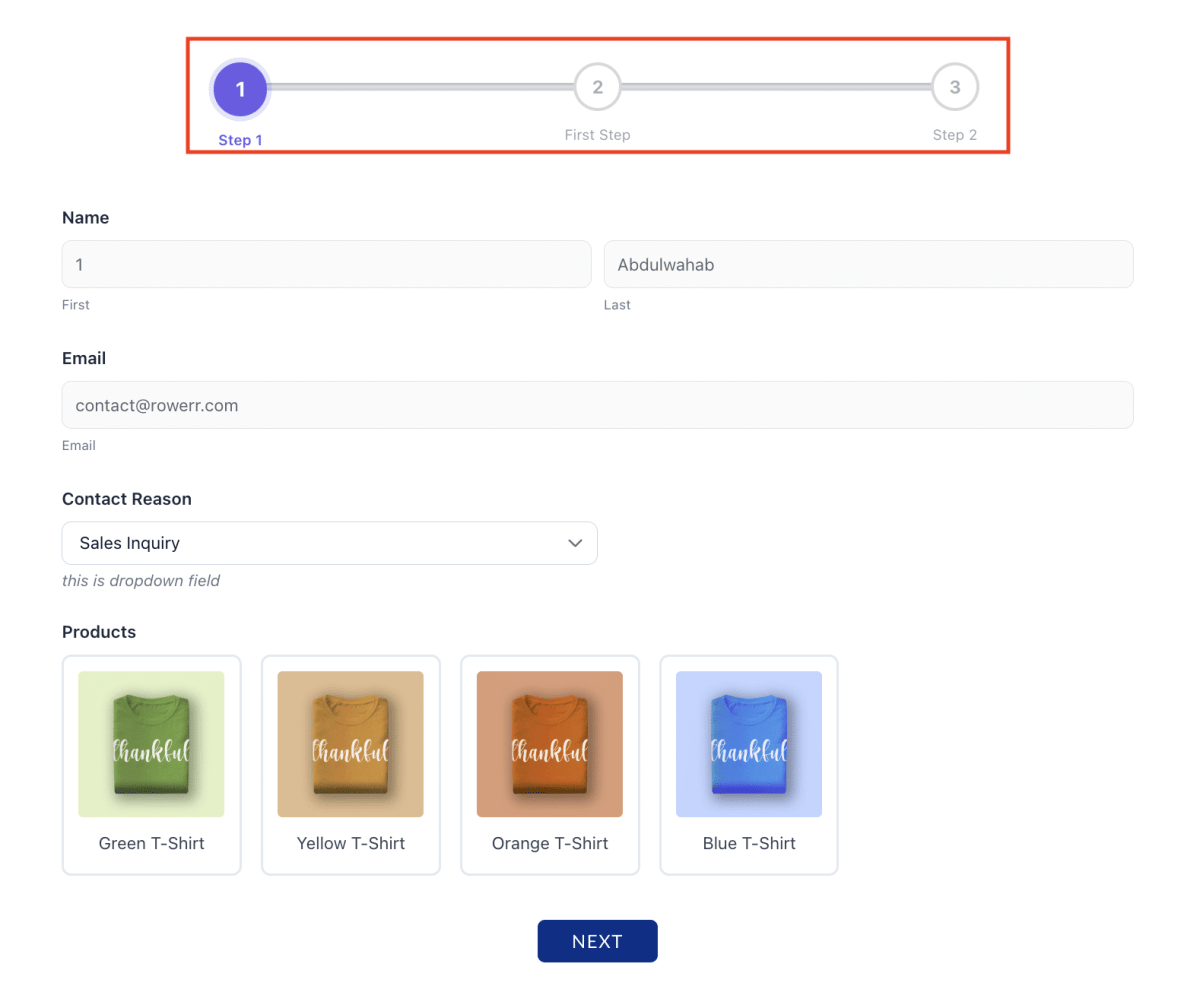
Split your WordPress contact form into multiple steps. Creates a multi-step form with progress indicator, Next/Previous buttons.
Consent / GDPR Free
GDPR compliance checkbox with customizable text. Required checkbox before form submission. Link to your privacy policy.
Create a Multi-Step WordPress Contact Form
Long forms can overwhelm visitors. FormsKit lets you turn any WordPress contact form into a multi-step form with progress indicators — and it is completely free.
How to Create a Multi-Step Form
- Open your WordPress contact form in the FormsKit drag and drop form builder.
- Drag a Page Break field between the fields where you want to split the form. For example, put personal details (Name, Email, Phone) on Page 1 and the message fields on Page 2.
- Add another Page Break if you want a third step. You can create as many steps as you need.
- FormsKit automatically adds Next and Previous buttons and a progress indicator (bar, circles, or dots).
- Save your multi-step form and preview it.

Pro Plan Fields — Unlock Advanced Power
The FormsKit Pro plan adds 10 advanced field types for users who need more from their WordPress contact form. These are professional-grade fields for surveys, signatures, advanced data collection, and more.
Rating Pro
Star rating field. Let users rate your products, services, or support. Choose 5 or 10 stars. Use with conditional logic — show different follow-ups based on rating.
Content Pro
Display read-only formatted content inside your form. Show instructions, terms, descriptions, or contextual information between fields. Supports rich text formatting.
HTML Pro
Embed custom HTML directly in your form. Add videos, maps, custom widgets, or any HTML content. Full creative freedom for your WordPress contact form.
Section Divider Pro
Visual separator between form sections. Add a title and description to organize long forms. Makes your WordPress contact form scannable and user-friendly.
Layout (Columns) Pro
Create multi-column layouts inside your form. Place 2, 3, or 4 fields side by side. Full control over column widths and responsive behavior.
Hidden Field Pro
Invisible field that captures data without user input. Track UTM parameters, referral sources, page URLs, or custom values using Smart Tags.
Digital Signature Pro
Touch/mouse signature pad. Users can draw their signature on screen. Saved as an image. Essential for contracts, agreements, and consent forms.
Rich Text Editor Pro
WYSIWYG text editor inside your form. Users can format text with bold, italic, lists, and links. Perfect for detailed messages or content submissions.
Likert Scale Pro
Survey-style matrix question. Users rate multiple statements on a scale (e.g., Strongly Disagree to Strongly Agree). Essential for professional surveys.
Net Promoter Score Pro
NPS survey field — "How likely are you to recommend us?" with 0–10 scale. Automatically calculates promoters, passives, and detractors.
Additional Pro fields:
Camera Capture Pro
Access the device camera directly from your form. Users can take a photo and attach it instantly. Great for ID verification, damage reports, or visual feedback.
Repeater Pro
Let users add multiple sets of fields dynamically. Example: "Add another phone number" or "Add another team member." Users click a + button to add more rows.
Entry Preview Pro
Show users a summary of all their answers before they submit the WordPress contact form. Reduces errors and improves data quality for long forms.
Elite Plan Fields — Payments & E-Commerce
The FormsKit Elite plan turns your WordPress contact form into a powerful payment and order form. Accept payments, apply coupon codes, and display order totals — all inside FormsKit.
Single Item Elite
Add a product or service with a fixed price. Users see the item name and price. Supports quantity selection and custom price labels.
Multiple Items Elite
Display multiple products or services with prices. Users select one option. Great for service tiers, plan selection, and product variants.
Checkbox Items Elite
Multi-select payment items. Users can choose multiple add-ons, extras, or services with prices. Totals are calculated automatically.
Dropdown Items Elite
A dropdown selector where each option has a price. Perfect for size-based pricing, service levels, or quantity-based ordering.
Coupon Code Elite
Let users apply discount codes. Supports percentage and fixed discounts. Set usage limits and expiry dates. Validates in real-time.
Order Total Elite
Displays the calculated total from all payment items, including discounts from coupon codes. Updates automatically as users make selections.
Payment Gateway Elite
Accept payments via Stripe, PayPal, and more. Secure checkout embedded directly in your form. PCI compliant with tokenized card processing.

Coming Soon — Quiz, Survey, Registration & More Extensions
FormsKit is not stopping at contact forms. We are building a full suite of extensions that will transform FormsKit into the most powerful form builder plugin on WordPress.
🧠 Quiz Extension
Create graded quizzes with correct answers, scoring, and result pages. Perfect for schools, courses, onboarding, and knowledge tests. Auto-grade and send results via email. Integrates with LearnDash and BuddyBoss.
📊 Survey & Poll Extension
Build professional surveys with Likert scales, NPS scores, and result aggregation. Create polls with real-time result display. Export survey data as CSV or PDF reports.
📋 User Registration Extension
Turn your WordPress contact form into a complete user registration system. Create custom registration forms with role assignment, email verification, and profile fields. Works with MemberPress and BuddyBoss.
🔄 Conversational Forms
One-question-at-a-time form experience like Typeform. Engaging, modern, and high-converting. Perfect for lead generation and qualification WordPress contact forms.
Direct Integrations — HubSpot, Mailchimp & 10+ Platforms
FormsKit connects directly with the most popular marketing, CRM, email, and membership platforms. Every WordPress contact form submission can be automatically sent to your favorite tools.
HubSpot
Sync form submissions as contacts and deals in your HubSpot CRM. Map form fields to HubSpot properties.
Mailchimp
Add subscribers to your Mailchimp lists automatically. Map fields, assign tags, and trigger automations.
MailerLite
Grow your MailerLite subscriber list with every WordPress contact form submission. Map fields and assign groups.
MailPoet
Connect your MailPoet newsletters. Add subscribers with custom fields and list assignments directly from FormsKit.
ActiveCampaign
Push contacts and tags to ActiveCampaign. Trigger automations based on WordPress contact form submissions.
AWeber
Add subscribers to AWeber lists with field mapping and tag assignment from your contact form.
MemberPress
Create memberships and member registrations through FormsKit forms. Map form fields to membership levels.
LearnDash
Enroll users in LearnDash courses directly from form submissions. Perfect for course registration WordPress contact forms.
BuddyBoss
Create BuddyBoss profiles and group memberships from form submissions. Build community registration forms.
Webhooks
Send form data anywhere via custom webhooks. Connect to Zapier, Make.com, or your own API endpoints.
How Rowerr Can Help You Build Better WordPress Contact Forms
FormsKit is built by Rowerr — the team behind WPKits, a growing ecosystem of premium WordPress plugins. We believe essential features should never be locked behind paywalls. That is why FormsKit Lite includes conditional logic, file uploads, multi-step forms, and 18 field types — all completely free.
Why Choose FormsKit Over Other Plugins?
- Most Generous Free Plan: 18 field types, conditional logic, entry management, file uploads, and Smart Tags — all free. No other form builder plugin gives you this much at zero cost.
- Built for Performance: Clean PHP 7.4+ code. No jQuery bloat. No unnecessary database queries. Your WordPress contact form loads fast and does not slow down your website.
- Native Elementor Widget: Not just a shortcode embed — a full-featured Elementor widget with 60+ style controls. Design your form directly in the Elementor editor.
- Gutenberg Block: A native Gutenberg block for the modern WordPress editor. Search "FormsKit" and embed your form in seconds.
- Developer Friendly: PSR-4 autoloading, extensive hooks and filters, custom Smart Tags API, and well-documented code. Extend FormsKit the way you want.
- Privacy First: All data stays in your WordPress database. No external connections by default. GDPR consent field included free.
Our Plugin Ecosystem — WPKits
FormsKit is just one part of the WPKits family. We also offer:
- WooKit — Advanced WooCommerce toolkit with tier pricing, BOGO deals, cart discounts, bundles, and more.
- QuoteKit — Request a Quote system with negotiation chat, email lifecycle, and admin management.
- WishKit — WooCommerce wishlist with sharing, multiple lists, and analytics.
All built with the same philosophy: give more for free, charge fairly for advanced features.
Ready to Build Your WordPress Contact Form?
Install FormsKit Lite today and create your first form in under 5 minutes. No credit card. No registration. Just install and build.
🚀 Get FormsKit FreeFrequently Asked Questions About WordPress Contact Forms
Yes! FormsKit Lite includes 18 field types, conditional logic, file uploads, multi-step forms, entry management, Smart Tags, and spam protection — all completely free. No hidden costs, no feature limits, no trial periods.
FormsKit provides three methods: a Gutenberg block (search "FormsKit" in the block inserter), a native Elementor widget, or a shortcode [formskit id="123"]. All three embed the same WordPress contact form.
Yes. FormsKit uses minimal, non-intrusive CSS that adapts to any properly-coded WordPress theme. It works with Astra, GeneratePress, Kadence, OceanWP, and all major themes.
Yes! Multi-step forms are free in FormsKit Lite. Just drag a Page Break field between your form sections. FormsKit automatically adds progress indicators and navigation buttons.
Yes — conditional logic is completely free in FormsKit. Show, hide, or require fields based on user input. Supports AND / OR conditions. Most form builder plugins charge $49–99/year for this feature.
FormsKit includes a built-in honeypot (always active), plus support for Google reCAPTCHA v2/v3, Cloudflare Turnstile, and hCaptcha. You can also use the custom CAPTCHA field with math puzzles.
Payment fields (Single Item, Multiple Items, Checkout Items, Coupon, Order Total, and Payment Gateway) are available in the Elite plan. FormsKit Lite focuses on form building and data collection.
Lite — 18 fields, conditional logic, multi-step, file uploads, Smart Tags, 2 email notifications — all free. Pro — Adds 13 advanced fields (signatures, surveys, repeaters, NPS etc.). Elite — Adds payment fields, coupons, and payment gateway integrations.
All WordPress contact form submissions are stored securely in your WordPress database. You can view, search, star, and export entries from FormsKit → Entries in your dashboard.
FormsKit includes a free GDPR / Consent field. All data is stored locally in your WordPress database. No external connections are made unless you explicitly configure a CAPTCHA provider.