

Create a WordPress Contact Form
Completely Free with FormsKit
A no-nonsense walkthrough covering everything — 18 free fields, drag-and-drop builder, conditional logic, unlimited auto-reply emails, entry management with color tags, map view, and beautiful built-in themes.
If you have been searching for how to create a contact form in WordPress for free, you have probably run into a wall of plugins that give you three fields and then ask for $99 a year to unlock anything useful. FormsKit takes the opposite approach. The free plan ships with 18 field types, full conditional logic, two email notifications including a user auto-reply, unlimited delayed follow-up emails, a complete entry management dashboard with color tags, admin notes, location pins, and a map view, plus built-in form themes — all at zero cost. This guide takes you through every step, from installing the plugin to embedding a polished multi-step form on your page.
What Sets FormsKit Apart from Every Other Form Plugin
There is no shortage of WordPress form plugins. What makes FormsKit different is what it gives you at zero cost — features that others treat as premium selling points.
Text, email, phone, address, file upload, date picker, checkboxes, radio buttons, sliders, password, CAPTCHA, GDPR consent, page break, and more — every Lite field is permanently free.
Show or hide any field based on a visitor's input. Build branching forms with AND/OR rule support, without paying a subscription for this essential feature.
Admin alert and visitor confirmation email are both free. Stack unlimited additional follow-up emails on top, each with its own send delay and conditional trigger.
Schedule follow-up messages to send minutes, hours, or days after submission. Build a simple nurture sequence from a single contact form, completely free.
Label incoming submissions with colour-coded tags — urgent, resolved, pending, follow-up. Filter and sort your inbox visually without any third-party CRM.
Write internal notes on any submission that only admins can see. Track progress, assign tasks, or add context — right inside the entry, inside WordPress.
Each submission is geo-tagged automatically. Switch to the map view in your entries dashboard to see where your enquiries originate — city, country, and precise coordinates on an interactive map.
Generate a shareable link for any entry instantly — useful for handing off to a colleague, presenting to a client, or routing a submission to the right team without exporting anything.
Switch between pre-designed form themes with a single click. Typography, colours, border styles, spacing, and button appearance — all controlled visually, no CSS required.
A proper native widget for Elementor, not a simple shortcode drop-in. Over 60 dedicated styling controls let you design every part of your form directly in the Elementor editor.
No jQuery dependency. PSR-4 autoloading. Scripts load only on pages that contain a form. Your Core Web Vitals stay clean and your page speed stays fast.
All data stays in your own WordPress database. No external calls by default. GDPR consent field, honeypot spam protection, and multiple CAPTCHA providers — all included free.
Install & Activate FormsKit
FormsKit Lite is available directly from the WordPress plugin directory. The whole process takes under two minutes — no account registration, no trial, no payment details.
In your WordPress admin, navigate to Plugins → Add New Plugin.
Search for "FormsKit". Click Install Now on the FormsKit Lite result.
Once installed, click Activate. The FormsKit menu appears in your sidebar.
Open FormsKit → Settings first. Set your global From Name, From Email address, and any CAPTCHA provider keys before creating your first form.
Build Your First Contact Form
The FormsKit editor uses a drag-and-drop canvas. Fields on the left panel get dragged onto the form canvas on the right. No code involved at any stage.
Opening the Form Builder
Go to FormsKit → Add New in your dashboard.
Give your form an internal name — something like Contact Page Form. This name is admin-only and won't appear publicly.
Drag fields from the left panel onto the canvas. Reorder them by dragging the handle on the left edge of each field row.

Recommended Starting Fields
- Name — structured field with First and Last sub-fields built in
- Email — validates format automatically; supports confirmation sub-field
- Phone — international country code selector with flag icons
- Subject — single-line Text field for the enquiry topic
- Message — Paragraph Text with adjustable row height
- CAPTCHA — math puzzle, reCAPTCHA, Turnstile, or hCaptcha — your choice
Smart Tags — Dynamic Data Anywhere
Smart Tags are shortcodes that pull real values into field defaults, email subjects, and message bodies at the moment of submission. FormsKit includes more than 20 built-in tags:
- {user_email} — logged-in user's email address
- {user_display} — logged-in user's display name
- {site_name} — your WordPress site title
- {page_url} — full URL of the page hosting the form
- {date} — current date at time of submission
- {unique_value} — auto-generated unique submission ID
- {field:id} — pulls the submitted value of any specific field
Complete Fields Reference — Lite, Pro & Elite
FormsKit organises its field library into three tiers — matching exactly what you see in the builder sidebar. The Lite tier is entirely free with no time limit.

← Scroll on small screens →
| Field | Plan | What It Does | Configuration Options |
|---|---|---|---|
| Single Line Text | Lite | Short single-line input — names, subjects, brief answers | Placeholder, default value, min/max length, input mask |
| Paragraph Text | Lite | Multi-line textarea for detailed messages | Row height, character or word limit, Smart Tags |
| Dropdown | Lite | Single-select dropdown with unlimited options | Pre-selected default, placeholder text, conditional logic |
| Multiple Choice | Lite | Radio buttons for picking one answer | Image or icon choices, conditional branching |
| Checkboxes | Lite | Multi-select checkboxes with visual choice support | Min/max selections, image choices, conditional logic |
| Numbers | Lite | Numeric input with validation boundaries | Min, max, step value, integer or decimal mode |
| Name | Lite | Structured full-name field | Simple (first/last) or extended (title, middle, suffix) |
| Lite | Email address input with live format validation | DNS check, confirmation sub-field, Smart Tag auto-fill | |
| Number Slider | Lite | Draggable range slider showing value in real time | Min, max, step, custom value labels |
| Custom Captcha | Lite | Spam protection with multiple provider support | Math puzzle, Q&A, reCAPTCHA v2/v3, Cloudflare Turnstile, hCaptcha |
| Phone | Lite | Phone number input with country flag selector | International formatting, E.164 validation |
| Address | Lite | Complete address block with all standard sub-fields | Street, City, State, ZIP, Country — show/hide each |
| Date / Time | Lite | Calendar date picker and/or time selector | Date-only, time-only, combined; min/max; block specific days |
| Website / URL | Lite | Web address input with format enforcement | Auto-validates URL structure, Smart Tag compatible |
| Password | Lite | Masked password input with strength indicator | Required character types, minimum length, confirmation field |
| File Upload | Lite | Drag-and-drop file attachment | Allowed MIME types, max file size, multiple files toggle |
| Page Break | Lite | Splits the form into a multi-step wizard | Progress bar, dots, or circles indicator; step labels |
| GDPR Consent | Lite | Mandatory consent checkbox for privacy compliance | Custom label text, privacy policy link, required toggle |
| Hidden Field | Pro | Invisible data capture using Smart Tags | UTM params, referrer, page URL, custom values |
| Layout (Columns) | Pro | Multi-column field arrangement | 2, 3, or 4 columns; custom widths; responsive stacking |
| Section Divider | Pro | Visual break with heading and description | Title, subtitle, icon, separator style |
| HTML | Pro | Embed raw HTML content inside the form | Videos, maps, custom widgets, any valid HTML |
| Rating | Pro | Star rating selector | 5 or 10 stars; conditional follow-ups based on score |
| Signature | Pro | Touch or mouse signature pad, saved as image | Canvas dimensions, pen colour, clear button |
| Likert Scale | Pro | Survey matrix for rating multiple items | Custom scale labels, configurable column count |
| Net Promoter Score | Pro | Standard 0–10 NPS question | Per-score labels, automatic promoter/passive/detractor split |
| WYSIWYG | Pro | Rich text editor embedded in the form | Bold, italic, lists, links, full text formatting toolbar |
| Content | Pro | Read-only formatted text block between fields | Instructions, terms, contextual guidance |
| Entry Preview | Pro | Shows submitters a review of all answers before sending | Reduces submission errors on longer forms |
| Camera | Pro | Accesses device camera for live photo capture | Photo attached immediately to the submission |
| Repeater | Pro | User-expandable field group (add more rows) | Min/max rows, custom add/remove button labels |
| Coupon | Elite | Discount code input with live validation | Percentage or fixed amount, usage limits, expiry dates |
| Payment | Elite | Stripe and PayPal gateway embedded in the form | PCI-compliant tokenised card processing |
| Single Item | Elite | Fixed-price product or service entry | Quantity selector, custom price label |
| Checkbox Items | Elite | Multi-select add-ons each with a price | Running total auto-calculated, image support |
| Dropdown Items | Elite | Dropdown where every option carries a price | Tier-based or size-based pricing |
| Multiple Items | Elite | Radio-style product selector with pricing | Plan or package selection with visual labels |
| Total | Elite | Live grand total of all payment fields | Updates instantly as selections change, reflects coupons |
Conditional Logic — Free and Fully Functional
Conditional logic is what turns a static form into a smart one. Fields appear or disappear based on what a visitor has already entered — reducing clutter and making forms feel tailored to each person.
Click any field on the canvas to open its configuration panel on the right.
Select the Conditional Logic tab inside the panel.
Toggle logic on. Choose whether this field should Show or Hide when conditions are met.
Define the rule: IF [field] [equals / contains / is not] [value]. Layer conditions with AND (all must match) or OR (any can match).
Save the form and preview to confirm the branching works as expected.

Email Notifications, Auto-Replies & Delayed Follow-Ups
FormsKit gives you two free notification emails per form — one for the admin, one for the visitor. Beyond those two, you can add unlimited additional auto-replies with individual send delays, all free.
Setting Up the Admin Notification
Inside the builder, click the Settings tab (gear icon at the top of the panel).
Expand Notifications. The first entry is pre-configured for the site admin.
Set Send To as {admin_email}. Write a subject like New enquiry from {field:name}.
In the body, add {all_fields} — this renders a structured table of every submitted value automatically.
Set Reply-To to {field:email} so replying to the notification goes directly back to the enquirer.
Visitor Auto-Reply Confirmation
Click Add New Notification to create a second entry.
Set Send To as {field:email} — the address the visitor submitted.
Write a personalised subject using Smart Tags: We received your message, {field:name}.
Craft the body using {site_name}, {field:name}, and other tags. Save.
Unlimited Delayed Follow-Up Emails
Click Add New Notification again for each follow-up email you want to schedule. Each notification has its own send delay setting — choose to send immediately, after a set number of minutes, hours, or days. Combine this with conditional triggers to send different emails based on what the visitor selected in the form.
- Immediate send — triggers the moment the form is submitted
- Delayed send — scheduled at a custom interval after submission
- Conditional routing — different email content based on field values
- No limit — add as many follow-up emails as your sequence requires

Multi-Step Forms — Free
Long forms presented on a single page consistently perform worse than forms broken into steps. FormsKit's multi-step builder is part of the free Lite plan with no restrictions.
Open your form in the builder. Drag a Page Break field to the point where you want a step to end.
Repeat for as many steps as needed — no cap on the number of pages.
FormsKit automatically renders Next and Back navigation and a progress indicator. Pick from bar, circles, or dots style.
Every step validates its own required fields before the visitor can advance — incomplete data cannot slip through to the next page.
Elementor users: use the widget's built-in step preview to check any page of the form without submitting it.

Entry Management — Tags, Notes, Location & Maps
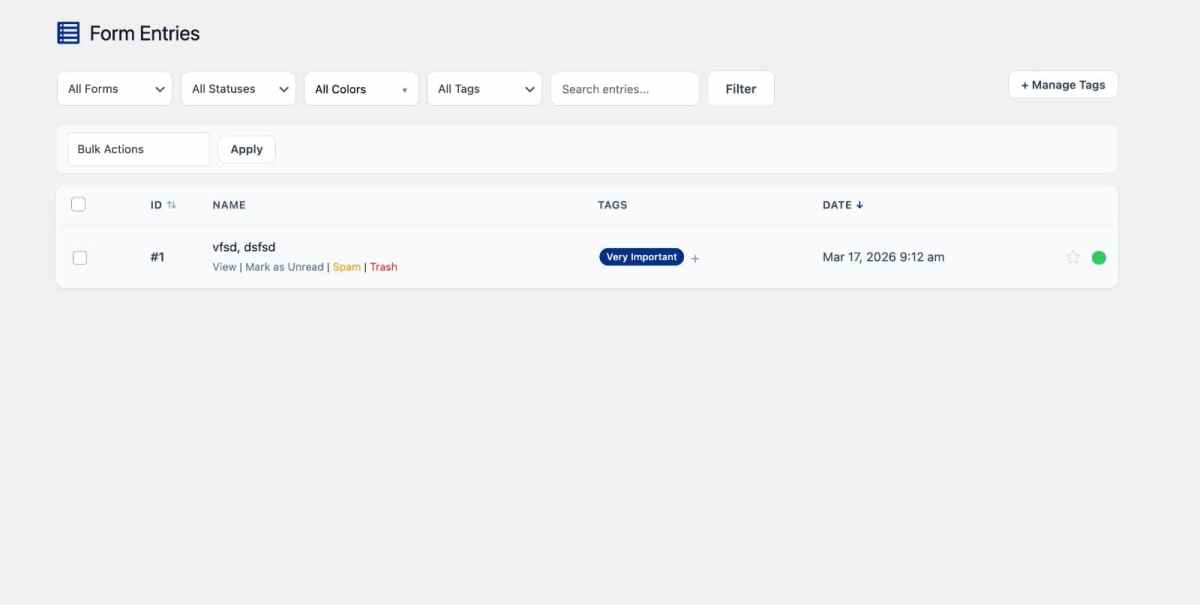
Every submission is stored in your WordPress database and surfaced through a purpose-built entries dashboard. The tools built into that dashboard are what make FormsKit genuinely unique.
View, search, filter, sort, and export all form submissions from the FormsKit → Entries screen. No paid plan needed — ever.
Tag individual entries with colours — red for urgent, green for handled, yellow for waiting on reply. Filter your entire inbox by tag in seconds.
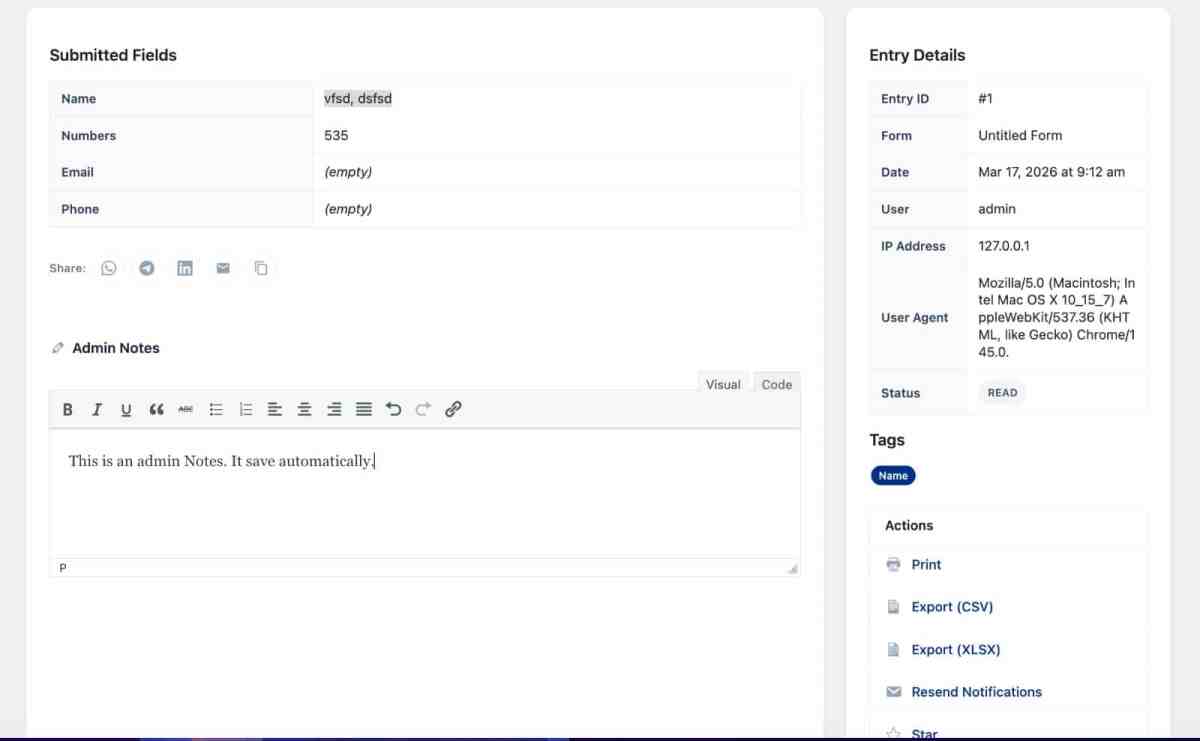
Attach internal notes to any submission. Assign actions, record context, or mark next steps — visible only to team members logged into the dashboard.
Generate a direct link to any entry with one click. Hand it to a colleague or share it with a client without exporting data or copying and pasting fields.
FormsKit records the geographic location of each submitter using their IP address (with consent). Every entry carries city, country, and coordinates.
Toggle the entries dashboard into Map View to see every submission plotted as a pin on a world map. Click any pin to open the full entry detail instantly.
Form Themes & Visual Styling
FormsKit ships with built-in visual themes that make your form look polished straight out of the box. No CSS knowledge needed at any point.
Switching Themes
The Style panel in the form builder contains a theme picker. Each theme controls the complete visual treatment of your form — field borders, corner rounding, colour palette, label positioning, and button style. One click applies the theme across the entire form.
Fine-Tuning in Elementor
Embed via the FormsKit Elementor widget and you unlock over 60 style controls in the Elementor panel — without writing a single line of CSS:
- Field background, border colour, corner radius, and internal padding
- Label typeface, size, weight, and colour
- Submit button fill, hover state, shadow, and border radius
- Error message position and colour
- Progress bar height, fill colour, and animation style
- Outer container background, padding, and box shadow

Direct Integrations
Sync submissions directly to your CRM, email marketing platform, or membership plugin — no Zapier needed for the core connections.
Embedding Your Form
Three ways to place your form on any page — use whichever fits your workflow.
Elementor Widget
Search FormsKit in the Elementor widget panel and drag it onto your section. Pick your form from the dropdown. Style directly inside Elementor using 60+ controls in the Style tab.
Gutenberg Block
In the block editor, type /formskit to find the block. Insert it and select your form from the dropdown that appears in the block settings sidebar.
Shortcode
Copy the shortcode from the forms list — [formskit id="1"] — and paste it into any Classic Editor field, Text widget, or HTML block on your page.
Frequently Asked Questions
Ready to Build Your Free WordPress Contact Form?
Head to wpkits.io, grab FormsKit Lite, and have a fully configured form live on your site in under five minutes — no subscription required.
Get FormsKit Free at wpkits.io →Built a Form, Need a Website to Match?
Rowerr is the team that built FormsKit and the wider WPKits plugin suite. We design and develop WordPress websites, WooCommerce stores, LMS platforms, AI-powered tools, and mobile applications. If you need professional help configuring complex form workflows — or want a complete site built around your forms — we are the right people to call.
Work with Rowerr →Stuck on Any Part of This Setup?
LMSCrafter specialises in WordPress and LMS platform implementation. Whether you need help with FormsKit's conditional logic, auto-reply sequences, Elementor styling, entry management configuration, or anything else covered in this guide — reach out and we will walk you through it personally. No question is too basic.
Contact LMSCrafter →